EA SPORTS FC Mobile has introduced a new Rank Up system. This system helps you improve your Players and adds a personal touch to the new Skills system. In this article, we’ll explore how to rank your Players.

Ranking up Players involves boosting their overall rating (OVR), raising their maximum training level, and earning a Skill Point. When you rank up a Player, their OVR increases by 1. You can rank up a Player up to five times, which means you can upgrade an 80 OVR Player to an 85 OVR Player, for instance.
The OVR of your Players plays a crucial role in increasing your Team OVR. A higher Team OVR has a significant impact on your scoring chances in VS Attack or League vs. League matches.
How Rank Up Works
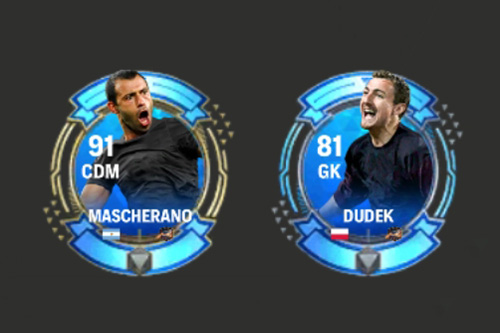
In FC Mobile 26, the Rank Up system has completely changed compared to the previous season. You no longer need duplicate player cards or URP Mascherano/Dudek to increase ranks. Instead, EA has introduced a new Rankup Currency system.
- Duplicate players are no longer required.
- Rank Up now only uses Rank Up Point, which you can earn from events and other game modes.
- URP Mascherano/Dudek is no longer needed for ranking. Instead, you can trade any leftover Mascheranos for 100 Rank Up Points each, and there is no limit to how many you can exchange.
- The cost of Rank Up depends on the OVR of the player. Higher OVR players will require more Rank Up Points.
- The chance/probability mechanic is removed. When you pay the required Rank Up Points, the rank goes through.
How to Rank Up Players
To rank up your Players, follow these steps:
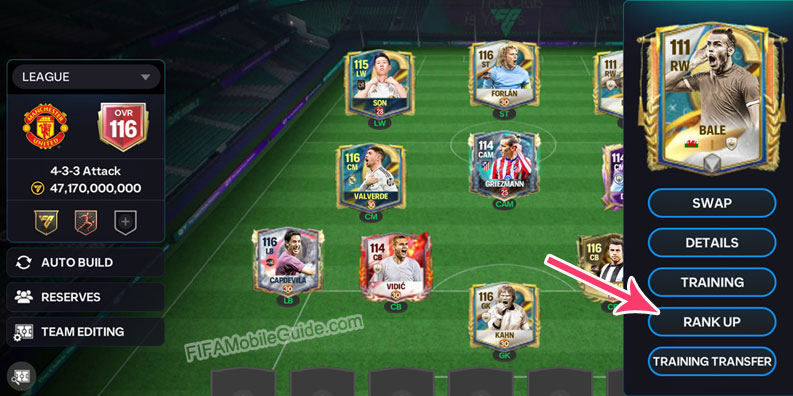
Go to the Club > My Team page and select the player you want to rank up. Then, tap the Rank Up button on the player’s profile to open the Rank Up screen.
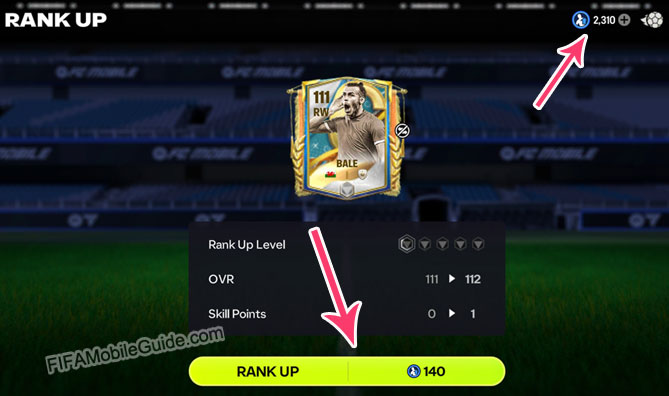
On the Rank Up screen, your available Rank Up Points are shown at the top right. The cost for the next rank is displayed at the bottom middle.
If you have enough Rank Up Points, tap the Rank Up button to increase the player’s rank by 1.
Repeat the process for Rank 2, Rank 3, Rank 4, and Rank 5. Each rank requires more points according to the player’s OVR.
Each rank increases the player’s rank and grants 1 Skill Point. Once Rank 5 is reached, your player is fully ranked and has earned 5 Skill Points from ranking.
Rank Levels
The rank of a Player is indicated by the color of the gem on the Player Item. This helps you determine at which level a Player has been ranked.
| Rank | Color |
|---|---|
| 1 |  Green |
| 2 |  Blue |
| 3 |  Purple |
| 4 |  Red |
| 5 |  Orange |
Additionally, the number of ranks your Player has achieved is displayed in the rank-up menu.
You can also buy and sell Ranked Players on the Market! The price of these Ranked Players depends on the number of ranks they have. More ranks translate to a higher price on the Market.
Rank Up Costs
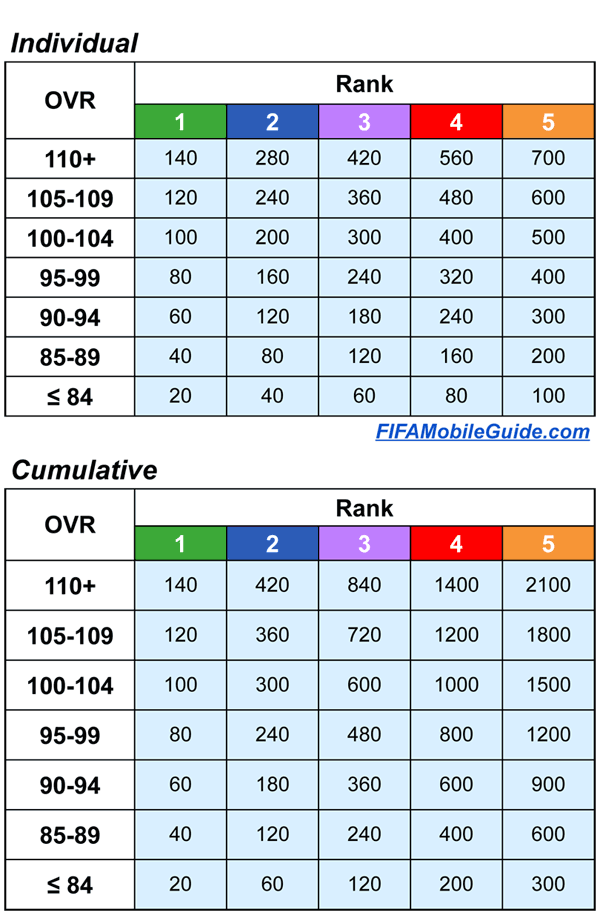
The Rank Up cost varies depending on the player’s OVR and Rank level. Higher OVRs and Ranks require more resources to upgrade. Here’s the full list of Rank Up costs for each OVR range and Rank level:
How to Buy Ranked Players
To buy a ranked player from the market, it’s quite simple:
- First, open the Market.
- Find the player you want to purchase.
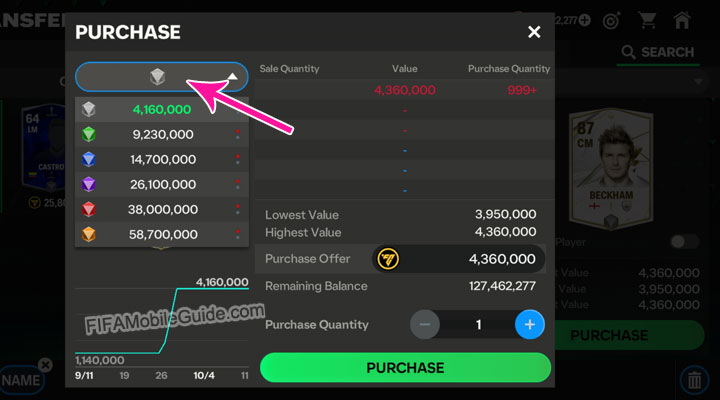
- Click on the Rank icon located above the player’s profile.
- You’ll see the dropdown prices for Rank 1 through Rank 5. Choose the Rank you want to buy.
- Adjust the buyer’s price in the Purchase Offer section.
- Finally, tap the Purchase button.
We hope you have found this EAS FC Mobile 26: Rank Up guide helpful. Please comment below if you have any questions.
If you need help calculating your players’ ranks and figuring out what’s needed to reach the next Team OVR, try our Team OVR Calculator.
FAQ
No, you can’t. You can transfer training levels, but ranks cannot be transferred between cards.
You can earn Rank Up Points from events and other in-game activities. You can also trade leftover Mascheranos for 100 Rank Up Points each.
For players with 110+ OVR, you need 2100 Rank Up Points to upgrade them from Rank 0 to Rank 5 (gold).
For players with 110+ OVR, you need 1400 Rank Up Points to upgrade them from Rank 0 to Rank 4 (red).
No, you can’t. Once a player is ranked up, the rank cannot be removed from the card.
 PlayStyles: The Definitive Guide
 Rank & Sell Calculator
 Team Badge Guide
 Scouting Camp Guide


Im wondering, if my full team is fully ranked up to orange but needed plus 1 rank to get to the next ovr, what do I need to do
Nothing. Rank 5 (Gold) is the maximum rank, and there is no Rank 6.
Change one player to another with higher base ovr